

How to increase Jiofi speed | Improve Jiofi speed 100% working tricks


Do you want to increase your Jiofi speed? If yes then this tutorial is especially for you because in this tutorial I will show you How to increase Jiofi speed.
Jiofi is not different from jio mobile network but jiofi speed is better than any 4G smartphone with jio sim. If jio network in your area is good and you are facing a slow internet problem with your jiofi then follow the steps given below to fix this issue.

How to increase Jiofi speed?
There are many ways to increase jiofi speed. The first way is by changing apn setting from auto to IPv4 and the second way is by changing place of your router. Always place router in open place for better speed (I recommend place jiofi in window). The third way is by not connecting more then 1 user at a time for better speed.
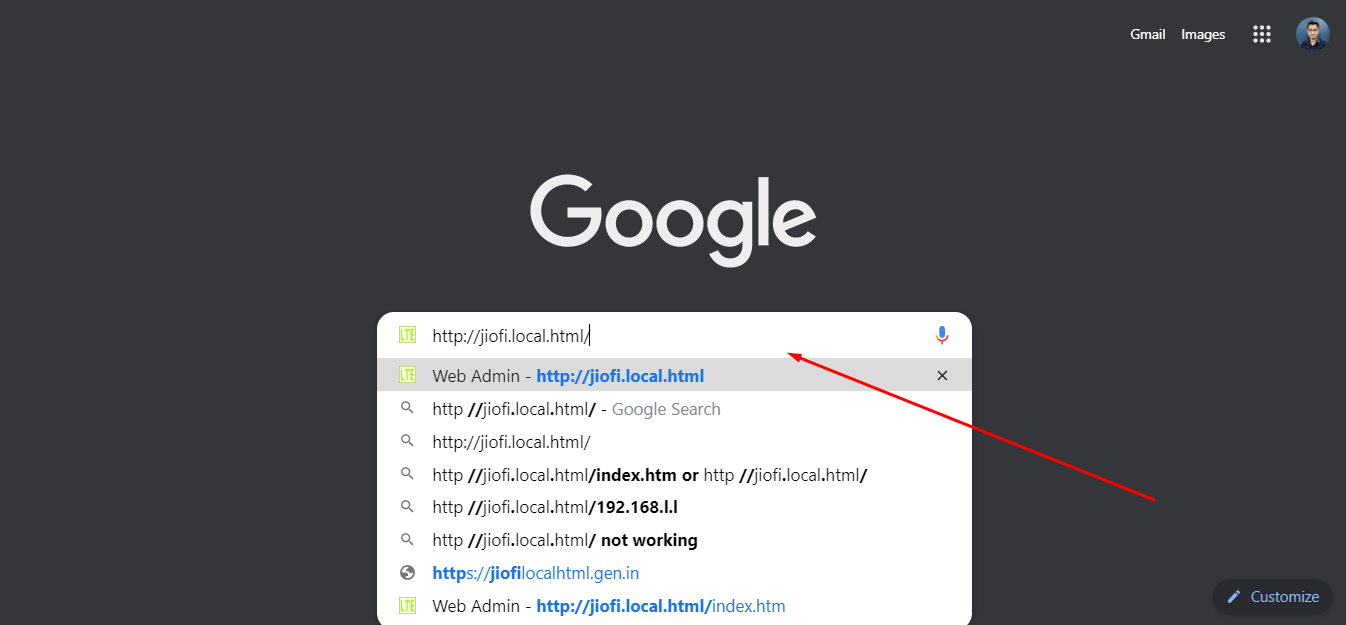
Visit http://jiofi.local.html/
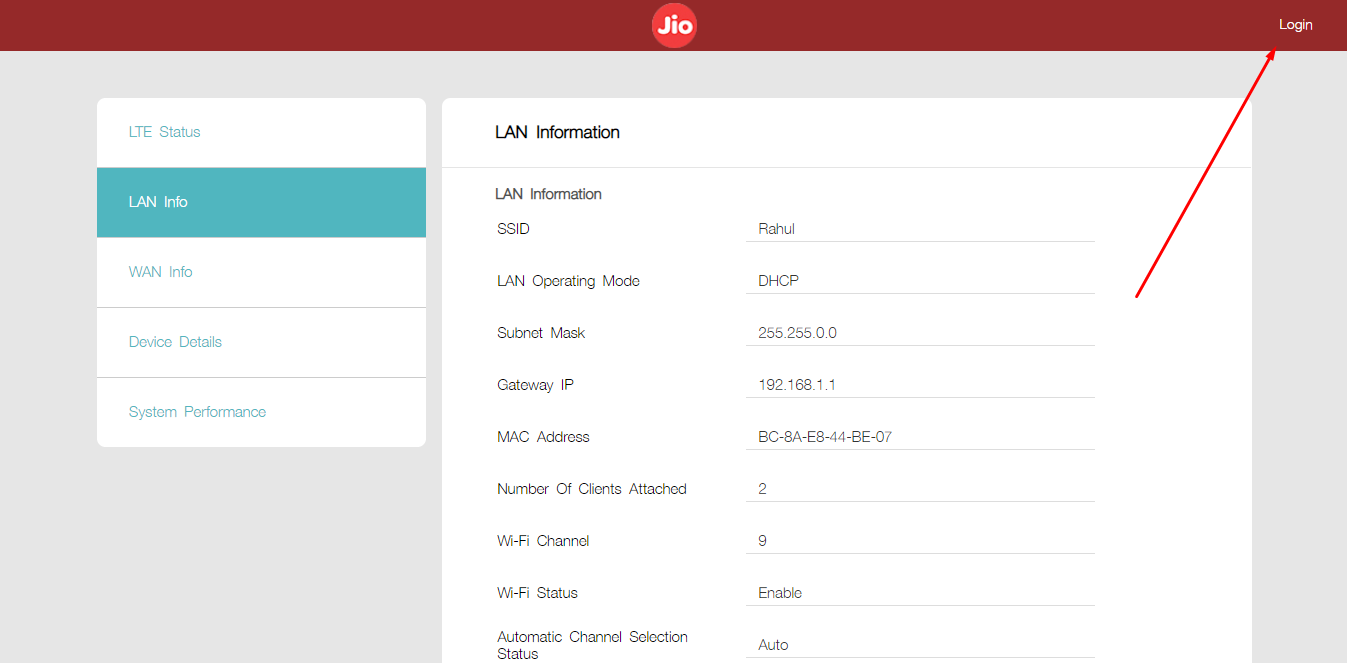
Click on Login
Go to Setting > LTE
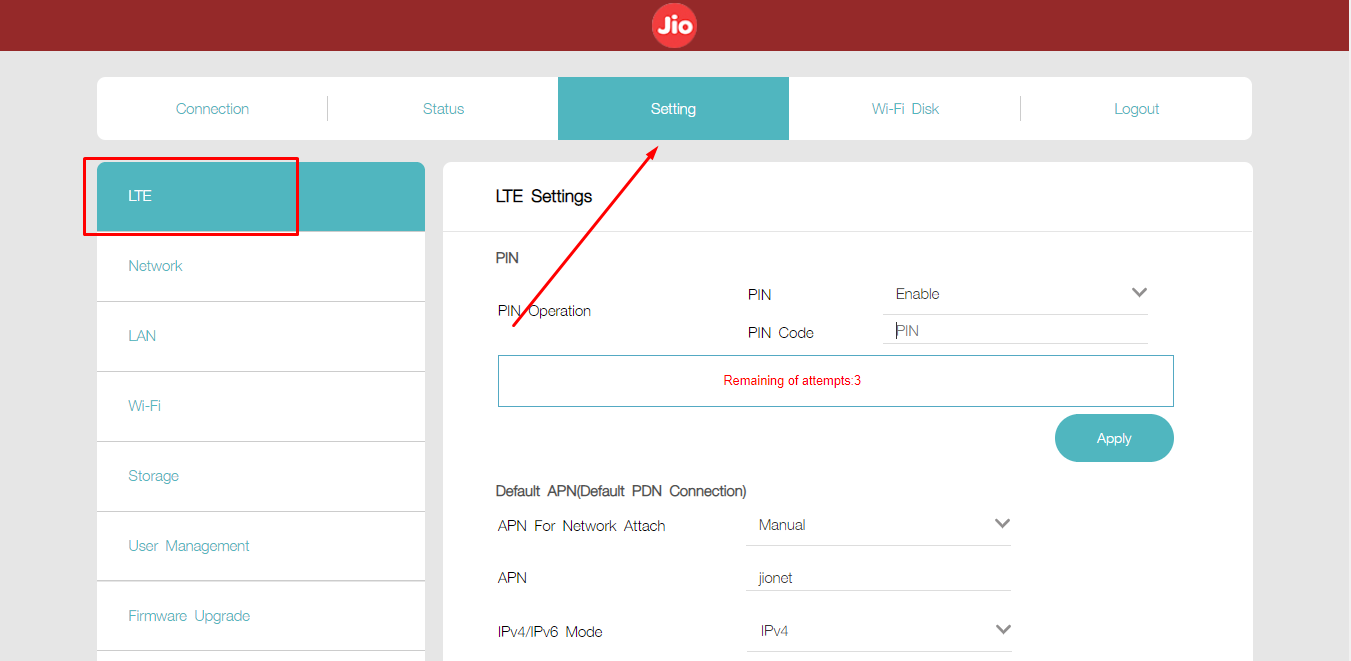
Change Default APN Setting
Here is the new default APN setting:
APN For Network Attach – Manual
APN – jionet
IPv4/IPv6 Mode – IPv4
After changing the APN setting now click on the apply button to save changes.

Restart Router

If you want better speed then you definitely set your APN setting to IPv4 and if you want better coverage then you can go with IPv6. I always recommend IPV4.
Also read – How to upload fonts to Canva
Conclusion
Here is how to increase Jiofi speed quickly?
- Visit http://jiofi.local.html/
- Click on Login
- Go to Setting > LTE
- Change Default APN Setting
- Restart Router
For a better understanding in detail of these steps, I prefer you to check the above tutorial.
After applying everything that is given in this article I assure your jiofi speed definitely increase
If you have any problem with your jiofi router related to this then please ask below in the comment box.
Written by Rahul Kumar Singh
Tech enthusiast who finds joy in coding and playing games
Comments 3

My jio FIver is not giving expected speed ..what can i do ..am using 2 laptops on same time only still taking too much load time

Well explained, thanks

good one its nicely written and explained to us.
Related Stories

The Small Tech Tweaks That Make a Big Difference
It’s easy to think that fixing a sluggish phone or laptop means dropping a ton of cash on a brand-new device. Sure, buying new hardware works, but you’d be surprised by how much life you can squeeze out of your current gadgets just by tweaking a few settings. Spending just a few minutes digging into […]

How to Get More Out of the Devices You Already Own
A strong urge to replace smartphones and laptops often strikes the moment a newer model arrives at the local electronics store. Vast amounts of money flow into advertising campaigns designed to convince buyers that their current gadgets are hopelessly obsolete. However, the devices sitting on desks right now still possess an enormous amount of computing […]

Why An Affordable eSIM Makes Sense For Smart Travelers
Careful plans for foreign tours bring excitement, long checklists, and important travel decisions. Travel eSIMs offer real convenience through digital setup and fast mobile data access abroad. Strong connectivity and steady data access keep maps, messages, and bookings within reach overseas. An affordable travel eSIM delivers practical data solutions without extreme roaming charges abroad. This […]
How to Make Your Devices Work Better for Your Routine
We all rely heavily on our computers and smartphones just to get through a normal day. But, it often feels like we are the ones adjusting our daily habits to suit our technology, rather than the other way around. If you want to make your devices work better for your routine, you have to take […]

How to Design Social Media Posts Quickly: A Practical Guide for Fast, High-Quality Content
Designing social media posts quickly is a common challenge for creators, marketers, and small teams. Deadlines are tight, trends move fast, and visual quality still matters. The best way to speed up your workflow is to combine simple design systems, smart tools, and repeatable processes. When done right, you can create scroll-stopping posts in minutes […]

I Didn’t Throw Away That Old Xbox Gift Card And You Shouldn’t Either
A couple of months ago, I was helping my roommate clean out his laptop before selling it. We were deleting old accounts, clearing browser history, and wiping saved passwords. That’s when he pulled up an email from 2022 with the subject line: “Your Xbox Gift Card Is Ready.” He laughed. “Oh yeah, my aunt gave […]